There is a point in every serious coding session when the assistant stops feeling like a tool and starts feeling like a meter.
You ask for a refactor. It reads the repository, changes six files, runs a test, and then asks for another decision. The work is good. The work is also expensive in a way that is hard to see until a quota bar turns red, a weekly allowance resets, or a “generous” plan quietly becomes a slower model.
This is why the current AI coding subscription market is difficult to compare. The products are not selling the same thing. Some sell an editor. Some sell a terminal agent. Some sell access to a family of models through a token pool. Some bundle coding into a broader assistant subscription. A leaderboard may tell you which model performed well on a benchmark. It cannot tell you whether the plan will fit the way you actually work.
The price tag is the least useful number
The usual buying question is simple: which plan gives me the most intelligence for the least money?
It is a natural question, but it hides three different costs.
- Model cost: what the provider charges for access, tokens, credits, or a seat.
- Workflow cost: how much context you must prepare, how often you change tools, and how much time you spend recovering from a wrong edit.
- Control cost: what happens when code, private repositories, commands, and billing cross an organizational boundary.
A $10 plan can be expensive if it breaks your flow every afternoon. A $100 plan can be rational for a developer who delegates large, well-scoped tasks all day. The reverse can also be true: an expensive plan may mostly buy permission to hit a limit later, while a modest plan covers the work that matters.
The word “unlimited” deserves particular suspicion. In practice, it often means unlimited access subject to rate limits, abuse guardrails, model availability, or a shared usage budget. Credit systems are not automatically worse. They can be more honest, provided the product shows what consumes them and gives you a way to forecast the next week’s work.
The best AI coding plan is not the one with the biggest model. It is the one that makes good engineering decisions easier to repeat.
A leaderboard measures models, not workflows
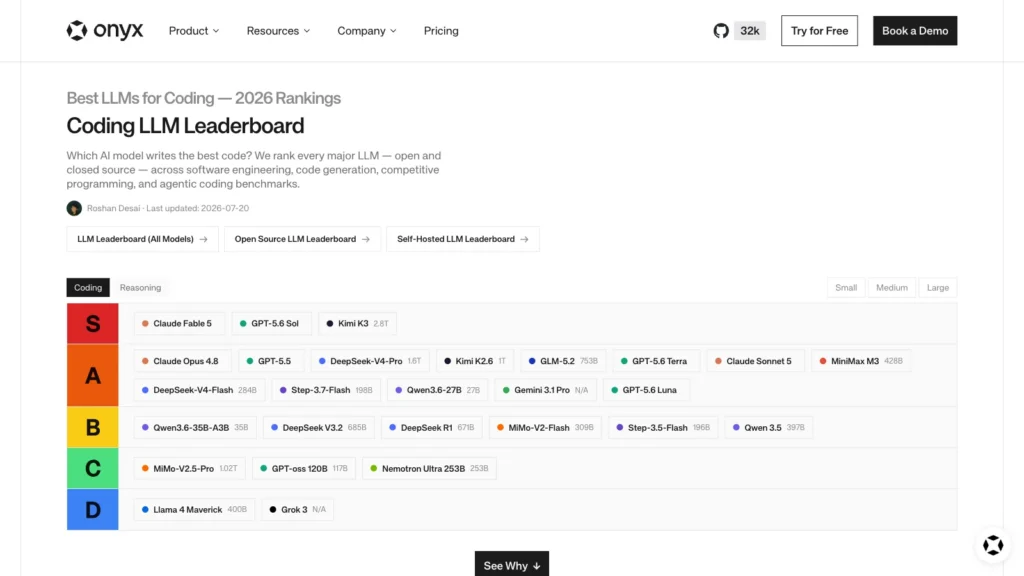
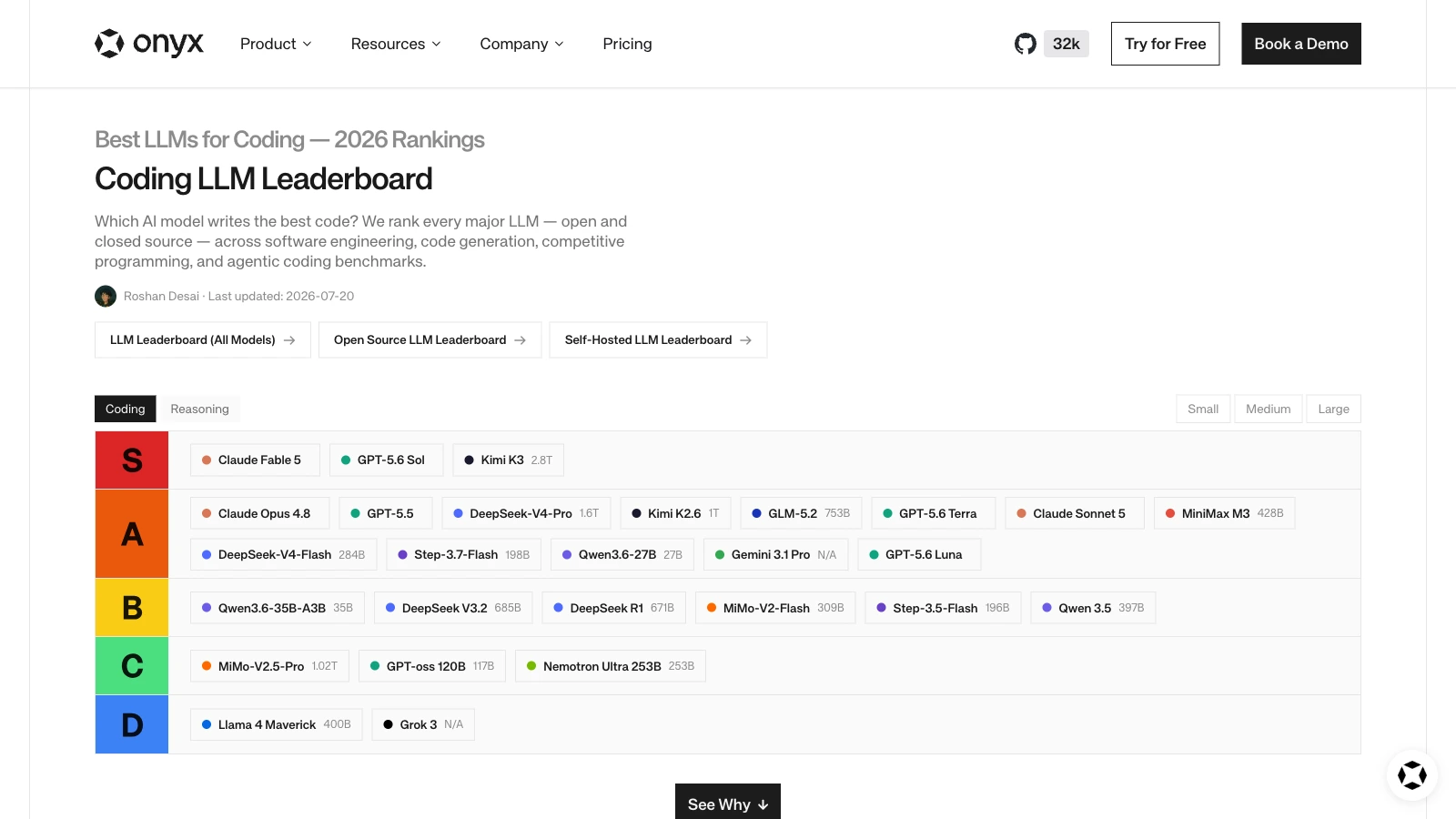
The Onyx ranking that prompted this comparison is valuable because it separates several kinds of coding performance. Its page discusses software engineering through SWE-bench Verified, code generation through HumanEval, competitive programming through LiveCodeBench, and terminal-based agent work through Terminal-Bench. Those are different questions, and a model can be strong at one while merely adequate at another.
That distinction matters. Generating a correct function from a docstring is not the same as changing an unfamiliar production repository. A terminal benchmark is closer to agentic work, but even it cannot capture your test suite, deployment rules, undocumented conventions, or the one database migration everyone is afraid to touch.
Benchmarks are measurements under conditions. They are not character certificates.
There are at least four reasons a high-ranked model may deliver poor value for a particular developer:
- The model may be available only through an interface that does not fit the developer’s editor or terminal.
- The plan may ration the expensive model so aggressively that the developer spends more time managing usage than writing software.
- The assistant may have weak repository retrieval, poor tool permissions, or an awkward approval flow.
- The benchmark may reward a kind of task that is not the bottleneck in the developer’s work.
The leaderboard is therefore best used as a shortlist. It can tell you which models deserve a controlled trial. It cannot replace the trial.
Five subscription shapes hiding behind one label
The second source, a KDnuggets opinion piece, highlights MiniMax, MiMo, GLM Coding Plan, OpenAI Codex, and Kimi Code as value-oriented options. The useful idea in that list is not the ranking of five winners. It is the variety of billing shapes hiding behind the phrase “AI coding subscription.”
| Shape | What you are really buying | Main question to ask |
|---|---|---|
| Token or credit pool | A budget shared across models or features | Can I see consumption clearly, and do unused credits expire? |
| Quota plan | A recurring allowance with hourly, daily, or weekly boundaries | Does the reset schedule match my work rhythm? |
| Editor-first assistant | Inline completion, chat, agents, and code review inside an IDE or Git host | Does it reduce context switching enough to justify the seat? |
| Terminal-first agent | Repository search, file edits, commands, and tool permissions | Are approvals, logs, and failure recovery good enough to trust? |
| Bundled assistant | Coding alongside research, writing, files, or general problem solving | Will I use the non-coding value, or am I paying for a bundle? |
MiniMax’s official Token Plan is a good example of the first shape. Its current page lists individual tiers at $20, $50, and $120 per month, with the same pool usable across MiniMax models and the company’s own coding clients; it also documents prepaid credit packs. That can be attractive for a developer who wants to route work through compatible tools. It is less attractive if a team needs a simple per-seat story or if a shared pool makes project budgeting ambiguous.
Kimi Code shows how a quota can be layered on top of a broader membership. Kimi’s help documentation says the membership features share a credit pool, while Kimi Code has a separate five-hour-per-week limit. The distinction is easy to miss and important to understand: having credits left does not necessarily mean the coding service is available without another limit.
GLM and MiMo belong in the same conversation, but their fast-moving plan pages are a reminder to verify the current allowance at checkout rather than repeat a number from a review. The KDnuggets article is explicitly opinion-based and was published June 29, 2026. It is useful context about how developers experience these plans; it is not a pricing authority.
What the mainstream plans actually buy
The established providers make the trade-off easier to see because their surfaces are more distinct.
ChatGPT and Codex: the bundle has real value
OpenAI’s current pricing page presents Codex as part of the ChatGPT plan family rather than as a separate editor subscription. The free tier has limited Codex access, Plus has expanded Codex usage, and Pro is positioned for research and coding with maximum Codex tasks. That is a powerful proposition for someone who already uses ChatGPT for research, planning, debugging, and documentation: the same subscription can cover several kinds of work.
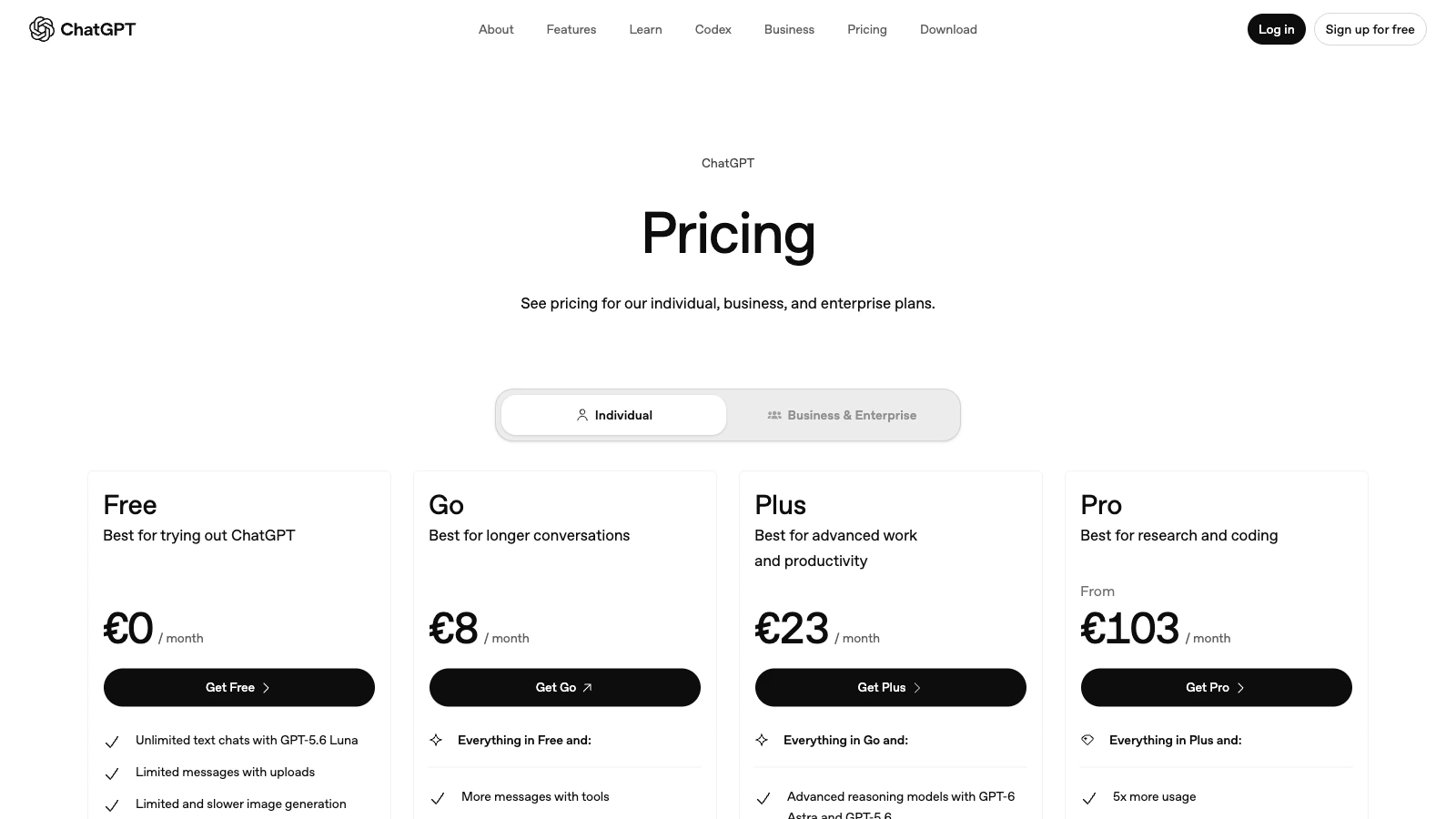
The weakness of a bundle is that its value is personal. If you only want inline completion, a general assistant may be too much interface around a narrow job. If you need deep repository work, the relevant number is not the plan’s headline promise but the Codex allowance, its reset behavior, and what happens when you reach it. OpenAI also documents credits as a way to continue using supported features on eligible personal plans, which turns “included” access into a budget decision rather than a binary one.
Claude Code: terminal depth with a shared meter
Anthropic’s current Claude pricing page lists Claude Code as included in Pro and Max. Pro is $20 per month when billed monthly, or $17 per month with the annual subscription discount shown on the page. Max starts at $100 per month and offers five-times or twenty-times the usage of Pro, subject to limits.
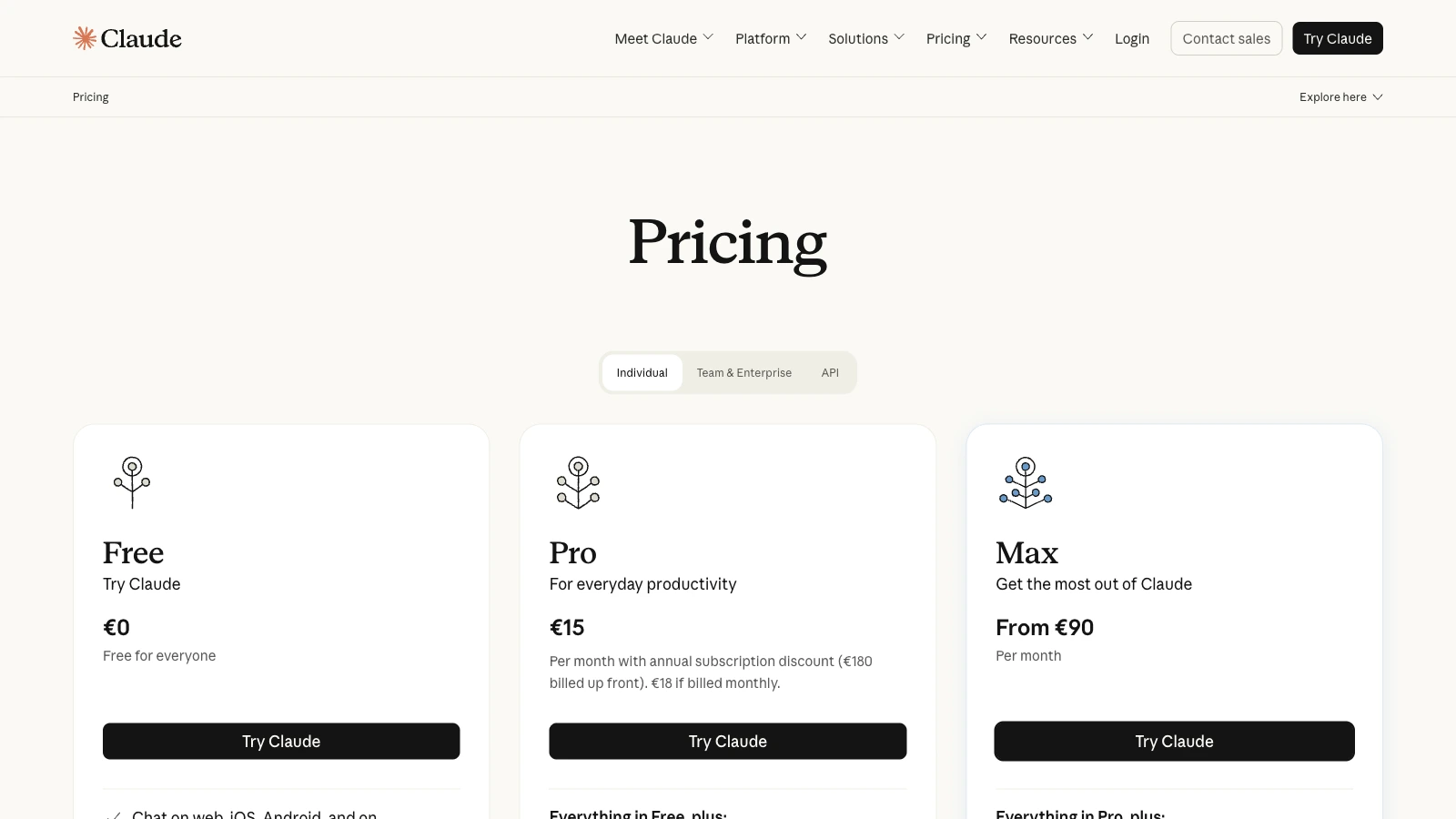
The important operational detail is in Anthropic’s help documentation: Claude and Claude Code share the same usage limits on Pro and Max. That is convenient, but it means a long coding session can reduce the capacity available for ordinary conversations. It also means that “I already have Claude” is not the same as “I have an unlimited coding agent.”
Claude Code’s terminal-first design is its strongest differentiator. Anthropic says it works with existing command-line tools, can use Git and MCP servers, and asks for permission before changing files or running commands. For a developer who thinks in repositories and shell commands, that is a coherent model. For a developer who wants completion suggestions to appear before the next line is written, it is a different product.
GitHub Copilot: the cheapest entry is also a platform bet
GitHub Copilot’s individual plans currently list Pro at $10 per user per month, Pro+ at $39, and Max at $100. Paid plans include unlimited code completion and next-edit suggestions, while chat, agents, code review, Copilot CLI, and other interactive features consume GitHub AI Credits. The plan page describes $15 in monthly total credits for Pro, $70 for Pro+, and $200 for Max.
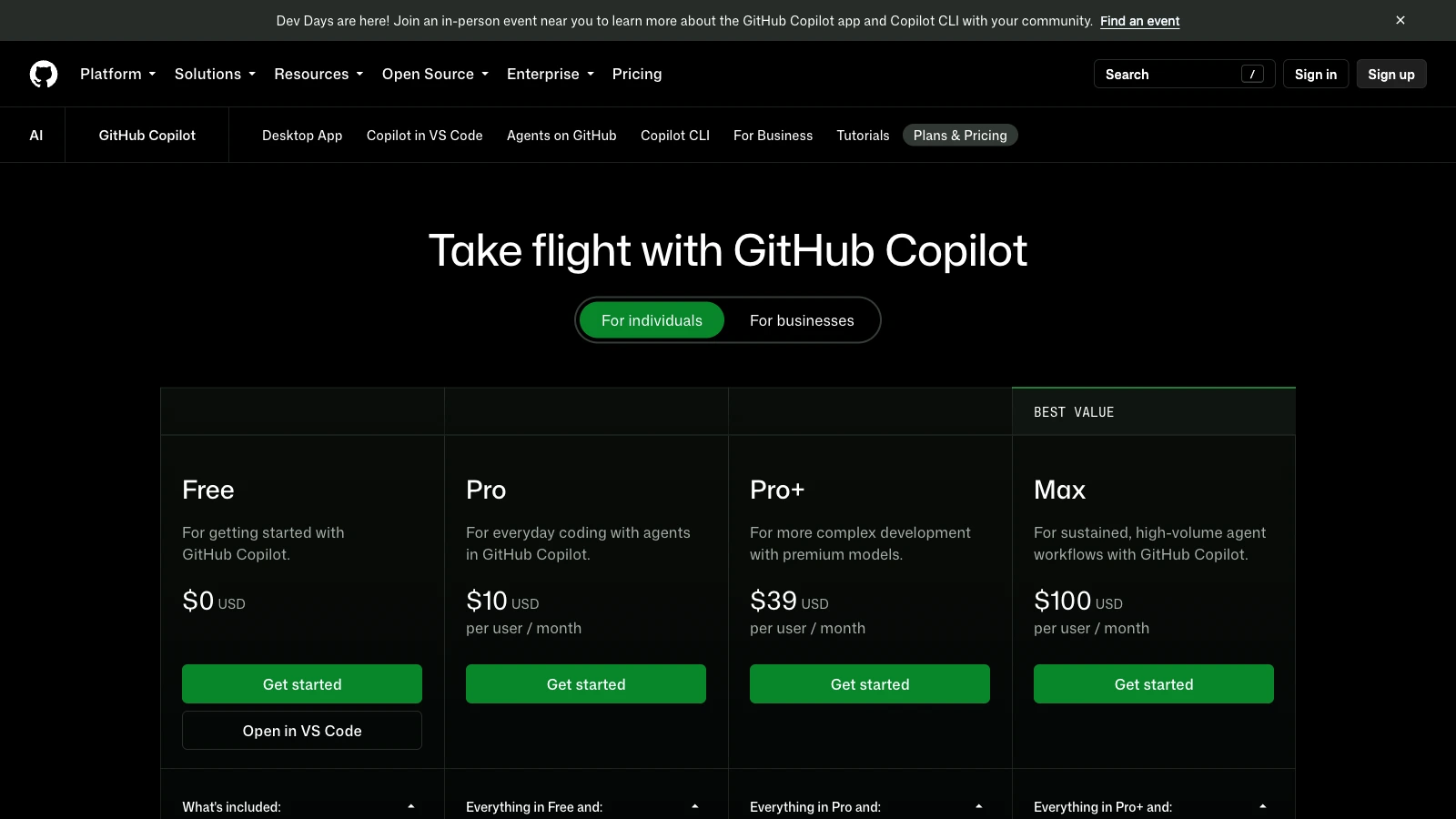
That makes Copilot Pro an unusually strong starting point for someone who lives in VS Code, Visual Studio, JetBrains, Neovim, or GitHub itself. The value is not only the model access. It is the number of places where the assistant is already waiting for the next small decision.
It also creates a platform dependency. Copilot is attractive when your code, issues, pull requests, and reviews already live in GitHub. If your organization uses another forge, another editor, or strict data boundaries, the integration advantage may shrink. The cheaper seat is not automatically the cheaper system.
Cursor sits in a similar but more editor-centered category. Its current pricing page lists Pro at $20 per month and includes extended Agent limits, frontier model access, MCPs, skills, hooks, cloud agents, and usage-based Bugbot. Its value is concentrated in the editor experience, which can be exactly right for an individual developer and harder to standardize across a mixed team.
Context is the hidden bill
AI coding tools do not charge only for the sentence you type. They charge, directly or indirectly, for the context that makes the sentence useful.
A short completion may use the current file. An agentic task may inspect a repository tree, read configuration, open related modules, run tests, interpret failures, and revisit the same files. The model’s output is only one part of that loop. A plan that looks generous for chat can feel restrictive when the agent is allowed to explore.
This is also where model quality and software quality diverge. A stronger model may produce a better first patch, but a smaller model with good repository context and a clean test loop can be more useful over a week. Conversely, a cheap model can produce a large amount of plausible code that increases review time. Productivity is not the number of lines accepted by an assistant. It is the number of correct decisions that survive contact with the system.
For private code, context has a security dimension. Ask where the provider processes prompts, what retention controls exist, whether training use is opt-out or opt-in, how organization policies are enforced, and whether logs are available. An individual plan can be technically capable while still being the wrong procurement choice for a regulated repository. A terminal agent that asks before running commands is safer than one that does not, but approval prompts do not replace least privilege or code review.
A practical buying method
I would evaluate an AI coding plan in five passes. The order matters because it keeps a compelling demo from making the decision too early.
- Describe the work, not the model. Write down whether the main tasks are completion, debugging, refactoring, repository onboarding, test generation, code review, terminal automation, or architecture discussion.
- Choose the surface. Decide where the work should happen: editor, terminal, GitHub, browser, or a combination. A model that requires a context switch for every task carries a recurring tax.
- Measure the limit. During a representative week, record how many agent turns, long contexts, review passes, and failed retries the plan allows. Do not infer this from a model’s advertised context window.
- Test recovery. Give the tool a task with an intentional failing test or ambiguous requirement. Watch whether it explains the mistake, narrows the change, and leaves the repository clean.
- Check the exit. Export your prompts, configuration, generated patches, and usage history. If leaving the plan means losing the team’s accumulated workflow, you are buying lock-in as well as assistance.
A small evaluation log is enough. Record the task, tool, model, time to first useful patch, number of retries, tests passed, and minutes spent reviewing. The point is not to create a laboratory benchmark. It is to make the decision visible to yourself.
task → context → patch → tests → review → accepted changeThe sequence is deliberately ordinary. A coding assistant is valuable when it improves the whole loop, not when it produces an impressive fragment in isolation.
What I would choose
For an individual developer who already lives in GitHub and an IDE, Copilot Pro is the most obvious low-cost first experiment. It buys a strong integration surface for $10 per month, while the credit system makes heavy agent use visible. It is not the universal winner; it is the cleanest baseline.
For someone who wants a terminal-native agent and already uses Claude for other work, Claude Pro is a coherent choice. The shared usage pool is the trade-off to monitor. Max is for sustained usage, not for making a single difficult task feel more prestigious.
For a developer who values one subscription across research, planning, writing, and code, ChatGPT Plus or Pro can be good value, provided the actual Codex limits match the workload. The bundle is the feature. It is also the reason to check the meter.
For experimental workflows, custom agents, or a preference for routing several models through compatible tools, MiniMax’s token-plan shape and Kimi Code’s membership model are worth testing. I would not buy either on a review’s allowance number alone. I would buy a month, inspect the quota display, run real repository tasks, and keep an exit route.
Teams should slow down further. GitHub Copilot Business or Enterprise, Claude Team or Enterprise, and Gemini Code Assist Standard or Enterprise offer administrative and security features that individual subscriptions do not. Google’s documentation also records a major 2026 transition: consumer Gemini Code Assist IDE extensions and Gemini CLI stopped serving individual, Google AI Pro, and Google AI Ultra tiers on June 18, while Standard and Enterprise access continued. That is a useful warning about the difference between a popular plan and a durable developer platform.
The verdict: buy continuity, not spectacle
The AI coding market is moving from “which model is smartest?” to a harder question: which arrangement lets a person or team keep making good decisions under real constraints?
Onyx’s benchmark board is a useful map of model capability. KDnuggets’ list is a useful reminder that token, credit, quota, and bundled plans feel different in practice. The official pricing pages add the details that opinion pieces cannot guarantee: shared meters, plan-specific surfaces, price changes, credit allowances, and the uncomfortable existence of limits.
My conclusion is modest. Start with the cheapest plan that fits your actual surface. Spend a week on representative work. Pay attention to retries and review time, not just successful demos. Upgrade when the plan removes a proven bottleneck. Leave when the meter, interface, or governance model makes the work less trustworthy.
The model will change. The subscription will change. Your repository will still be there on Monday morning, asking whether the code is correct and whether anyone understands it. That is the part of the workflow worth optimizing.
Primary sources and further reading
- Onyx — Best LLMs for Coding 2026
- KDnuggets — 5 AI Coding Subscription Plans That Give Developers the Best Value
- OpenAI — ChatGPT pricing and Codex access
- Anthropic — Claude pricing and Claude Code with Pro or Max
- Cursor — pricing
- GitHub — Copilot plans and pricing and GitHub Copilot plans documentation
- MiniMax — Token Plan
- Kimi — membership pricing and Kimi Code FAQ
- Google — Gemini Code Assist consumer account deprecation and Gemini Code Assist quotas
If you are thinking about the other side of the coding workflow, my earlier guides to TypeScript, NestJS, and Next.js architecture look at how much structure a project can carry before structure becomes another maintenance obligation.